
We're introducing our first completely new product for a new / expanded audience in many years: RASON® Desktop works on your PC or laptop, reads data from both Power BI Desktop and Excel Desktop, solves our full range of optimization / resource allocation, simulation / risk analysis, and data science / machine learning models, and writes results back to both Power BI Desktop and Excel Desktop.
If you use Analytic Solver for Excel, you already know the power of building a real optimization or simulation model — one that captures the true constraints, risks and tradeoffs of your business and finds the best answer, not just a plausible guess. Now we're making it possible to deploy those models directly into Power BI Desktop, where you and your colleagues can run scenarios and see results update in your dashboards in real time. No waiting. No manual exports. You can solve models alone with their own data, work with Power BI, with Excel, or with both.
Why Power BI? Why Now?
Power BI has become the reporting standard for tens of millions of business analysts and their managers. It does a superb job of answering "what happened?" — but it stops there. Slicers and what-if parameters let users explore one scenario at a time, but there's no way to ask "what *should* we do?" and get a defensible, optimized answer.
If you've ever exported data from Power BI into Excel, run your Analytic Solver model, and then manually imported results back into a report or presentation, you've lived this gap firsthand. RASON Desktop closes it.
The contrast is striking. Instead of a single case or a handful of manual cases, you get the full range of outcomes: probability distributions, sensitivity charts, and risk metrics, available in Power BI. Instead of a "best guess" allocation of staff time, equipment, material and more, you get the best possible allocation of those scarce resources — right in your Power BI dashboard.
Full-Power Optimization, Simulation, Data Science
RASON Desktop includes all the mathematical optimization power you've come to expect from us: Twelve built-in and plug-in Solver Engines for every type and size of problem, from linear / mixed-integer programming to non-linear and non-smooth optimization, from a few hundred to millions of decision variables. And it includes all the simulation / risk analysis power you'd expect from using Analytic Solver Simulation (which easily accepts and converts @RISK models, and greatly outperforms both @RISK and Crystal Ball) — as well as the full power of Analytic Solver Data Science.
But unlike those other 35-year-old products, RASON Desktop brings all these capabilities to you in Power BI. As you likely know, Analytic Solver also brings you all these capabilities in Excel for the Web - which the old products don't support at all. And since RASON is already available as a cloud service (see RASON Help), you can confidently expect even more from us: Support for your whole journey between desktop and cloud, and between "our own apps" and "your corporate systems".
How It Works: RASON Models in VS Code
If you're not familiar with RASON® (RESTful Analytic Solver® Object Notation), it is a high-level modeling language for the full range of decision intelligence models — spanning optimization, simulation, data science, business rules and decision tables/trees, and multi-stage decision flows.
Yes, this is a new language — but no, you don't have to spend a lot of time learning it from scratch. First, Analytic Solver includes a powerful automated translator from models expressed in Excel formulas, to equivalent models expressed in RASON. Second, RASON Desktop comes with an extensive library of (almost 200) example models you can use as a starting point. Third, with RASON Desktop you can use CoPilot, Claude, or another AI tool to help you write your model. They all know RASON's syntax and semantics - because they have access to our MCP Server inside RASON Desktop.
RASON Desktop is hosted inside Microsoft's powerful, free code (and model) editor known as VS Code. So you start by simply downloading and installing VS Code — then you can install the RASON Desktop Extension from the VS Code Marketplace, or even directly from within VS Code on your desktop or laptop PC. (If you ever do want to write programming code, VS Code is great tool for writing and testing Python, C# and more — read about our Solver SDK here.) Let's see a quick snapshot:
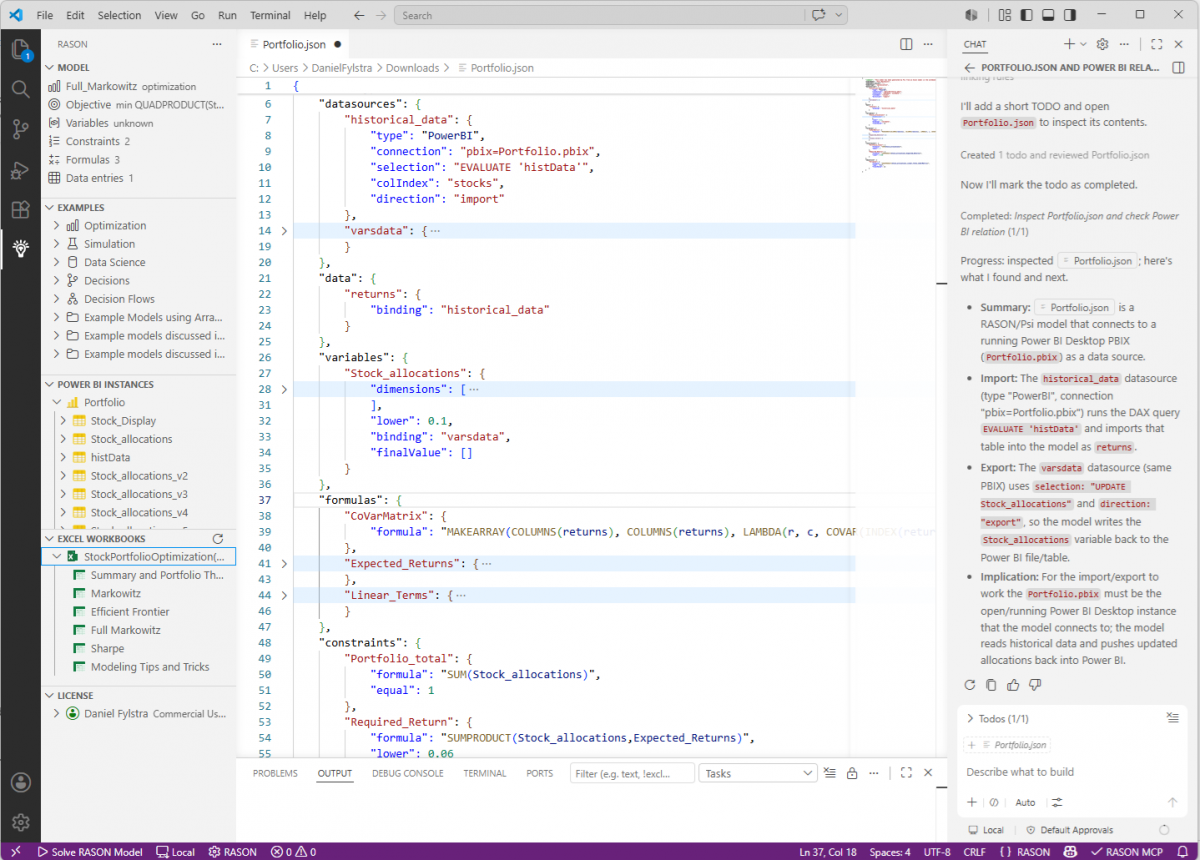
This is the VS Code editor, with the RASON Desktop Extension active. In the middle you can see an example RASON model (Portfolio.json) that solves for an optimal allocation of funds to stocks in a portfolio. At the top you can see how a RASON model can easily read data from Power BI, and near the bottom you'll see some functions, such as SUM and SUMPRODUCT, that are familiar from Excel. (Unlike other modeling languages for optimization or simulation, RASON includes virtually all of Excel's built-in functions.)
On the left, you can see a summary of the current model, a summary list of RASON example models, and lists of currently-open Power BI (.pbix) and Excel (.xlsx) files. As you'd expect from us, you can drag and drop a Power BI table or Excel range into the middle window, to automatically get the RASON syntax for accessing that table or range.
On the right, you can see VS Code's built-in CoPilot AI assistant, responding to a simple prompt asking it to explain the model in the middle window. As you'd expect from a brand-new product (at least from us, as a vendor with deep expertise), RASON Desktop is set up to help you get started quickly, and become super-productive with this tool. Indeed, there's a VS Code-style "walkthrough" and an interactive demo to help you with all the key initial steps.
RASON and the Value of Your Models
Here's something worth reflecting on: when you build a RASON model, you're not writing a script or macro. You're encoding deep domain knowledge about how your part of the business works — the constraints, the cost tradeoffs, the operational limits. That is valuable intellectual property. In too many organizations this is not recognized: the model lives on one analyst's laptop, buried inside a larger Python script or Excel workbook. There may be no catalog or version control, but even if there is, the core model is still buried — only the script / workbook is "maintained".
RASON models are structured JSON, designed to be saved, versioned, and catalogued. (That's why, for many years, we've operated a full cloud platform for shared, secure models at Rason.com.) When a model is maintained as a first-class organizational asset rather than buried in a personal spreadsheet, it survives personnel changes, grows more capable over time, and can be adapted for new problems without starting from scratch.
One of our goals with RASON Desktop is to help you bridge the gap, that so often arises, between solving your immediate, local business problem — often the work of one key analyst or small group — and solving multiple instances of similar business problems across a larger enterprise. If in reflecting on this, you realize you've been missing an opportunity, talk with us. Most of Frontline's customers are small teams within very large (Fortune 1000 / Global 2000) enterprises. We've had lots of experience with these issues and we can help!